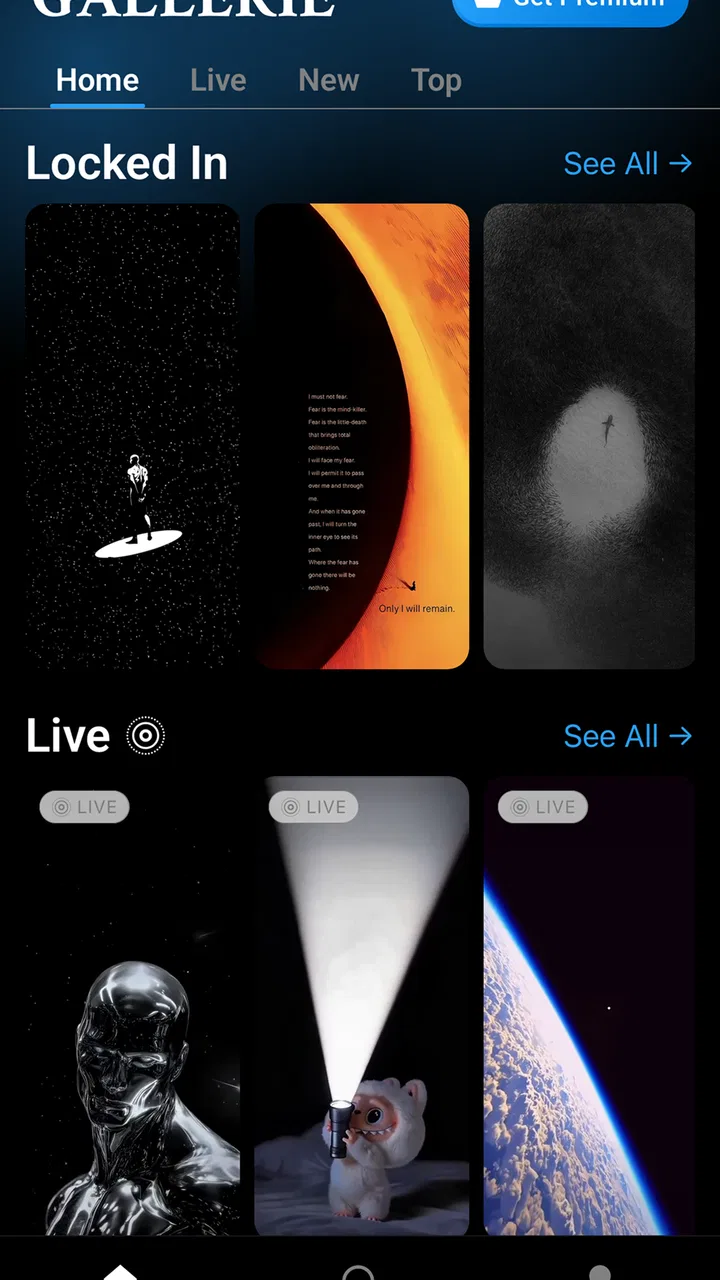
Gallerie Wallpapers
- 4.2
- Rating
- 1.00M
- Installs
- Free
- Price

 Analysis by App-foxy
I approached Gallerie Wallpapers as a personalization app rather than just another wallpaper shelf. Its promise is simple: help me spend less time sorting through weak images and more time finding a background that actually suits my phone. After using it, I think that focus is its strongest idea. It is not trying to replace every customization tool on a device; it is aimed at the moment when I want a better-looking screen without turning the search into a project.
The app comes from Sibelius Studios LLC and is free to install, which makes it easy to try without committing money first. It has a Teen content rating, an average score of 4.2 from around 13 thousand ratings, and more than a million installs. Those figures suggest that it has reached a substantial audience, but they do not tell me whether it will match every personal taste. Wallpapers are unusually subjective, so the real question is how efficiently the app helps me narrow down that choice.
What using Gallerie Wallpapers feels like in everyday life
The best way to understand this app is to imagine an ordinary morning when I am tired of looking at the same background. I do not necessarily want a full theme, a new icon pack, or a complicated launcher. I just want a clean image that makes the home screen feel less stale. Gallerie Wallpapers is built for that small but frequent decision, and its appeal comes from reducing the amount of visual clutter involved.
You May Also Like

 Blood Strike: 2.5 Anniversary
Blood Strike’s Loadouts Turn Every Drop Into a Tactical Gamble
A close look at Blood Strike’s custom loadouts: how fast access to signature weapons reshapes its battle royale rhythm, rewards preparation, and narrows the gap between fights.

 Pandora - Music & Podcasts
Pandora’s Music Is Easy to Start, but Harder to Recover
Pandora’s strength is its low-effort path from a seed to a station. Its weak spot is how much confidence it asks you to place in connection, setup, and quiet recovery.

 8 Ball Pool
 Is Built on Rivalries, Rematches, and Routine
A close look at the rivalries, rematches, shared routines, and unanswered safety questions that turn a quick pool match into a persistent mobile community.

 Samsung Music
’s Quiet Strength Is Playing What You Already Own
Its reach comes less from spectacle than from dependable access to a personal library. That simplicity is both the app’s strongest retention engine and its ceiling.

 AccuWeather: Weather Radar
AccuWeather Review: A Quick, Clear Forecast for Everyday Decisions
For everyday plans, the best forecast is the one you can understand quickly. AccuWeather makes rain timing, radar, and local conditions easy to act on, with a few trade-offs.

 Hill Climb Racing
Why Hill Climb Racing Still Turns Crashes Into One More Run
A tiny car, a bumpy hill and one more upgrade: Hill Climb Racing keeps resurfacing because its simple chaos makes every near-miss feel personal.
More From Our News Desk



Instead of treating every possible image as equally valuable, the experience is centered on a more selective gallery. That matters because wallpaper apps often become frustrating when they bury attractive choices under repetitive, low-quality, or poorly cropped material. Gallerie Wallpapers takes the opposite approach. Its identity is based on curation, so I can approach it with the expectation that the browsing process should feel more deliberate than an endless image dump.
I also like that the app sits naturally in the personalization category. It has one clear job, and that clarity is useful. I am not asked to learn a broad customization system before getting to the part I care about. For someone who changes backgrounds occasionally, that narrower purpose can be more comfortable than installing a large customization suite with controls they may never use.
A cleaner starting point than ordinary wallpaper hunting
My first practical recommendation is to browse with the phone itself in mind, not just the image. A picture can look excellent in a gallery and still feel awkward once icons, widgets, and notification elements sit on top of it. With a curated app like this, I would first look for backgrounds with a calm area where text and icons can remain readable. Highly detailed images may be attractive, but they can make the home screen feel busy after a few hours.
This is one of the less obvious trade-offs. Filtering out weaker images can save time, but it also means I am trusting someone else’s idea of quality. If I want a very specific niche, unusual color combination, or obscure subject, a broad image search may offer more possibilities. Gallerie Wallpapers is more useful when I value a strong starting point over unlimited choice.
The app is especially suitable for people who want a polished result quickly. I can imagine recommending it to a friend who changes their wallpaper every few weeks but does not want to compare dozens of nearly identical downloads. It is also a sensible option for a first-time smartphone customizer who wants a visible improvement without learning how several separate personalization tools work together.
How it compares with the usual alternatives
The usual alternatives fall into two groups. The first is the built-in wallpaper picker, which is convenient and often well integrated with the operating system. The second is a huge wallpaper catalog that offers almost everything, including user uploads and highly specific searches. Gallerie Wallpapers occupies the middle ground between those two approaches.
Compared with the built-in picker, it can feel more purposeful because the selection is not limited to whatever the phone manufacturer decided to include. Compared with a massive catalog, it should be less exhausting because the emphasis is on quality control. That balance is the reason I would choose it for routine browsing. I would not choose it when my priority is maximum variety, exact search control, or collecting images from a particular artist or community.
There is also a practical difference between finding a wallpaper and managing a complete visual setup. A dedicated wallpaper app will not automatically solve icon contrast, widget placement, lock-screen layout, or launcher behavior. I see that as a boundary rather than a flaw, but it is important to set expectations. If the goal is a complete redesign, another tool may be better. If the goal is a stronger background with minimal effort, this focused approach makes more sense.
Speed, heavy browsing, and the feel of performance
I look at performance here through the kind of browsing that can quietly become demanding: comparing several image candidates, switching away briefly, then returning to finish the choice. A useful habit is to narrow the search around the screen you want to improve before opening more options; that saves attention and makes the final preview easier to judge. Next, I consider what those choices mean for trust and user control.
Speed expectations for normal use
For this kind of app, perceived speed is less about complex editing and more about how quickly I can move from opening the gallery to making a confident choice. A wallpaper browser should feel light in the hand: images need to become useful quickly, navigation should not distract from browsing, and the path from discovery to applying a background should be understandable.
Gallerie Wallpapers benefits from having a narrow purpose. It does not need to behave like a full photo editor or a social network to be useful. That focused design gives me a reasonable expectation of a straightforward session: open the app, browse the selected images, decide whether one fits, and return to the home screen. The less time I spend managing unrelated screens, the more valuable the app becomes.
Still, wallpaper browsing is naturally visual and can be demanding at moments. Large images have more work to display than a simple text list, and moving quickly through a gallery can create a heavier moment than opening a static settings page. I would judge the experience by how gracefully it handles that transition rather than expecting every image to appear instantly on every phone.
On a newer device, I would expect the browsing flow to feel comfortable for ordinary sessions. On an older or more limited phone, patience may be more important when moving rapidly through image-heavy content. That is not a criticism unique to this app; it is a basic consequence of showing visual material. The useful point is that the app’s focused purpose does not remove the underlying demands of image browsing.
What happens during heavier use
The heaviest realistic use case is not a single wallpaper change. It is a long browsing session in which I keep opening image after image, comparing styles, backing out, and returning to earlier choices. Someone decorating several devices, helping a family member choose a background, or preparing a set of seasonal changes may spend much longer inside the gallery than a casual user.
In that situation, I would avoid judging performance from the first few screens alone. A good workflow is to pause when I find a promising image, note what works about it, and stop opening alternatives simply because they are available. This sounds like a style preference, but it has a performance benefit too: shorter, more intentional sessions are easier on both attention and the device than endless swiping.
Another useful habit is to decide whether I want the home screen or lock screen to be the visual priority before browsing deeply. That choice changes what counts as a good image. A background that works behind a sparse lock screen may be too distracting behind a crowded home screen. Making that decision early reduces repeated previews and helps me reach a result without unnecessary backtracking.
I would also be cautious about changing wallpapers repeatedly just to compare tiny differences. The app is best treated as a selection tool, not as a permanent animation running in the background. The less often I reopen it without a clear goal, the more efficient the overall experience becomes. This is one of the practical distinctions between a useful personalization routine and a time-consuming browsing habit.
Resource demands and device constraints
Gallerie Wallpapers supports devices running Android 8.0 or later, so compatibility reaches back across a wide range of phones. That is helpful for people who keep an older handset, but the operating-system requirement should not be confused with identical performance on every supported device. Android version compatibility tells me whether the app can run; it does not guarantee the same comfort level on a newer phone and an aging model.
On a device with limited storage or modest hardware, I would keep the workflow simple. I would avoid treating the app as a place to accumulate every appealing image. Choosing a small set of favorites and removing images I no longer use is a sensible general practice for any visual collection. It also makes future decisions easier because I am not repeatedly sorting through my own abandoned choices.
Screen size and display shape matter as well. A wallpaper that looks balanced on one phone may crop differently on another, especially when the device uses a tall display or places prominent interface elements near the edges. I would preview the final result with icons and widgets visible before deciding that an image is a keeper. This is a more reliable test than judging the picture in isolation.
People who use older phones should also consider the rest of their daily workload. If the device already struggles with multitasking, an image-heavy browsing session may feel less comfortable than using the built-in picker. In that case, the app may still be useful for occasional inspiration, but I would not make it part of a long daily customization routine. A lighter, native option can be the better choice when responsiveness matters more than selection quality.
Stability, interruptions, and recovery
Reliability in a wallpaper app is easy to overlook until something interrupts the process. A phone call, a quick switch to another app, or an accidental exit can break concentration during browsing. My preferred workflow is therefore conservative: decide on a small group of candidates, make the change once, and confirm that the phone looks right before moving on.
That approach also helps with recovery. If I lose my place, I do not need to reconstruct an elaborate editing project; I can simply return to the gallery and begin a shorter search. The app’s narrow role makes recovery less intimidating than it would be in a full customization suite. The trade-off is that I should not expect a wallpaper browser to preserve a complex design history or provide the same project-management tools as a dedicated editor.
For everyday reliability, I would pay attention to whether the selected image remains comfortable after the phone has been used normally. A background can seem perfect during a quick preview and become irritating once it competes with notifications, calendar widgets, or a bright app grid. Testing it during a normal day is part of reviewing the result, not just reviewing the gallery. If the screen feels cluttered, the problem may be the image choice rather than the app itself.
I also prefer to keep a backup plan in mind. If a chosen background does not crop well or makes text difficult to read, the built-in picker remains a practical fallback. That does not reduce the value of Gallerie Wallpapers; it simply recognizes that specialized apps and system tools serve different purposes. The specialized app helps me discover better material, while the system option is often the quickest way to restore a familiar setup.
Cost, audience, and the limits of curation
The free entry point is a genuine advantage. I can test the browsing style before deciding whether it deserves a regular place on my phone. There are in-app purchases ranging from $0.99 to $12.99 per item, so I would pay attention to which parts of the experience I actually use before buying anything. For me, a paid option would need to provide a clear improvement in the images or workflow rather than simply encouraging more browsing.
This pricing structure also makes the app easier to recommend cautiously. Someone who only changes a background now and then can start without spending money. Someone who wants a larger or more specialized collection should decide whether the extra material justifies the cost. I would not purchase anything impulsively during the first session. I would use the free experience long enough to learn whether the selection matches my taste.
The Teen rating is worth keeping in mind for families choosing apps together. It does not describe every image I will personally encounter, but it is a reminder that parents should use their own judgment when allowing younger users to browse personalization content. For an adult looking for phone backgrounds, the rating is unlikely to change the basic usefulness of the app, but it is still part of the installation decision.
There is one audience I would steer elsewhere: people who want to create their own wallpapers from photographs, illustrations, or precise color layouts. Gallerie Wallpapers is most appealing when I want curated discovery. If I already have a clear design in my head, a photo editor or design application will give me more control. Likewise, users who need live wallpapers, animated effects, or deep launcher customization should look for a tool built around those functions rather than expecting a curated gallery to provide them.
Version context and long-term expectations
The current version is 2.0.5, which places the app in a mature enough stage to be considered a regular utility rather than a first experiment. I still prefer to judge an app by how well it fits my routine instead of assuming that a version number guarantees a particular experience. For this title, the important question is whether its focused gallery continues to make choosing a background easier than the alternatives I already have.
That focus could be a strength over time. A narrowly defined product has a clearer standard: the images should be appealing, the browsing should remain understandable, and applying a choice should not feel like work. It could also become a limitation if my taste changes and the curated selection no longer feels broad enough. I would revisit it when I want inspiration, but I would not rely on it as my only source of visual customization.
Who should install it, and who should skip it?
I would recommend Gallerie Wallpapers to someone who wants a more considered background without spending an evening searching the entire internet. It suits users who value visual quality, prefer a short path to a finished home screen, and are comfortable accepting curation instead of demanding endless control. It is also a good fit for people who want to refresh an older phone’s appearance without changing the launcher or learning a new customization system.
I would suggest skipping it if the main requirement is absolute variety, user-created content, custom image design, or animated personalization. The app’s strength is its selected gallery, and that same strength creates its main limitation: I may find fewer choices in a narrow style than I would in a huge catalog. Users with very specific creative goals should start with a design tool or a broader wallpaper source instead.
My most useful tip is to choose for readability first and mood second. I would find an image with enough quiet space for icons, test it with my actual widgets, and only then decide whether its colors still feel right. That simple order avoids the common mistake of selecting a beautiful picture that makes the phone harder to use. It also lets the app’s curation work as intended: helping me reach a practical choice, not merely an attractive preview.
After that, I would keep the final setup for at least a normal day before browsing again. If it still feels comfortable during messaging, navigation, and quick checks of the home screen, the wallpaper has passed a better test than a few seconds of admiration. This is where the app becomes more than a gallery: it gives me a starting point for a screen that has to work repeatedly, not just look good once.
My performance verdict
Gallerie Wallpapers makes the most sense as a focused, free personalization app for people who are tired of low-value wallpaper browsing. Its strongest quality is not the promise of endless content; it is the effort to make the selection feel more worthwhile. The experience should be easiest to appreciate on a device that handles visual browsing comfortably, while owners of older hardware may prefer shorter sessions and the simpler system picker for quick changes.
I see its performance profile as practical rather than demanding in concept, with the heavier moments naturally arriving during extended image browsing. The app’s narrow purpose also makes recovery straightforward if I leave and return later: I can start another search without rebuilding a complicated project. That simplicity is valuable, although it does not replace the deeper controls or creative freedom of a full design application.
For me, the deciding factor is whether I want help choosing or total control over creating. If I want help, the curated approach is appealing and saves attention. If I already know exactly what I want, a broader catalog or editor will be more efficient. Overall, I would recommend giving it a try because the free starting point keeps the risk low, while the focused experience offers a genuinely easier route to a better-looking phone.
My final take: this is a good choice for deliberate, low-effort screen refreshes, especially when I want quality to narrow the search. It is not the universal answer for every customization style, but it understands its role clearly. Used with realistic expectations about device limits, cropping, and personal taste, Gallerie Wallpapers can turn an otherwise tedious wallpaper decision into a quick and useful part of making a phone feel like my own.
FAQs for Gallerie Wallpapers
01What is Gallerie Wallpapers, and what can I use it for?
Gallerie Wallpapers is a wallpaper application designed to help you personalize your Android or iOS device with attractive background images. After exploring the app, users can browse a collection of wallpapers by style, theme, or visual preference, then preview an image before applying or saving it. It is particularly useful for anyone who wants to refresh their home screen or lock screen without searching across multiple websites.
02Does Gallerie Wallpapers offer wallpapers for both phones and tablets?
The app is mainly intended for mobile devices, and its wallpaper selection is generally suitable for common smartphone screen sizes. However, the final appearance can vary depending on your device’s resolution, aspect ratio, and operating system. Some images may crop differently on tablets or larger displays, so it is a good idea to use the preview feature and check the framing before setting a wallpaper permanently.
03Is Gallerie Wallpapers free to download and use?
Gallerie Wallpapers can generally be downloaded without an upfront purchase, allowing users to explore its available collection at no initial cost. Depending on the version and platform, the app may include advertisements, optional premium content, or other in-app features. Before downloading images or subscribing to anything, review the store listing and the app’s payment information so you understand which features are free.
04How do I save or apply a wallpaper from Gallerie Wallpapers?
After finding an image you like, open its preview and look for the available action buttons, such as download, save, or set wallpaper. The exact steps may differ between Android and iOS because each operating system handles permissions and wallpaper settings differently. You may need to allow access to photos or files, and on some devices you will have to confirm the final wallpaper placement through the system settings.
05Does Gallerie Wallpapers require special permissions or an internet connection?
An internet connection may be required when browsing or downloading wallpapers, especially if the images are delivered from an online catalog. The app may also request permission to save images to your device or access the photo library, depending on the platform. These permissions should be checked carefully during installation. Once a wallpaper has been saved locally, you may be able to use it without remaining connected to the internet.
Pros
- Large wallpaper collection covering nature
- abstract
- space
- and minimalist styles.
- Images are easy to browse
- making it quick to find a suitable background.
- Supports refreshing your home screen with new wallpapers regularly.
- Many designs look sharp on modern phone displays.
- Useful option for users who enjoy changing wallpapers frequently.
Cons
- Some wallpapers may appear repetitive or similar across different categories.
- Image quality can vary depending on the wallpaper selected.
- Advertising may interrupt browsing or reduce the overall viewing comfort.
- Frequent wallpaper changes can increase battery use on some devices.
- The app may require storage or network access to download full-resolution images.

Gallerie Wallpapers
Gallery